News page
News pages should be created to News folder under the correct year.
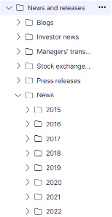
Stock related news and Press releases are fetched from the Cision system automatically (not anymore).
Headline is displayed on the page as main header
Lead text is displayed under headline
Content area is the place where you can add different kind of content by utilising blocks.
First content area is automatically set on the narrow area of the page.
Related content is used for showing links for other news at the end of the page (see related content block).
Is highlighted: if you choose this, the news item will be shown as first item on the news archive page
News publishing date: choose a date that is shown as publiching date on the news page
In tags tab add the tags related to the news item.
The tags are used for filtering in newsroom front page and in related content block for showing news automatically.
Note! Remember to choose also tag ”News” that is found in Optimizely release types.
Instructions for text styles:
- Remember to bring the content via notepad, don’t copy from word
- Use header 2 for subtitles
- Don’t use italics in quotes